
How changes are approved
Every Sevigram tool belongs to one of three groups:
- You ask
- The app reads from Sevigram
- You get the answer
Nothing changes.
- You ask for a change
- The app asks you to confirm
- Sevigram makes the change
Routine changes, made as soon as you confirm.
- You ask for a change
- The app prepares it and gives you a link
- You approve it in Sevigram
- Sevigram makes the change
Nothing happens until you approve. Links expire after 15 minutes.
The group is set by Sevigram, not by the app, and Sevigram enforces it. An app can’t skip a review link.
Changes you confirm in the app
Section titled “Changes you confirm in the app”These are routine changes that stay inside your account, such as adding a customer, recording an expense, drafting a quote or invoice, or updating an asset.
- The app describes the change and asks you to confirm. Claude and ChatGPT show their own confirmation before they call a tool that changes data.
- When you confirm, Sevigram makes the change and returns the result, usually within a few seconds.
- If it takes longer, the app checks back with the
get_actiontool and tells you when it’s done.
Check the details before you confirm, because the change is made as soon as you do.
Tools you confirm in the app
assets_attach_file, assets_cancel_maintenance, assets_complete_maintenance, assets_create, assets_create_category, assets_create_maintenance, assets_record_inspection, assets_restore, assets_seed_categories, assets_set_settings, assets_update, assets_update_category, assets_update_maintenance, bookings_set_deliverable_dates, bookings_set_responsibility, catalog_create_collection, catalog_create_product, catalog_create_service, catalog_generate_barcodes, catalog_set_barcodes, catalog_set_media, catalog_set_service_locations, catalog_set_status, catalog_update, catalog_update_availability, catalog_update_collection, catalog_update_inventory, catalog_update_variant_rules, customers_create, customers_set_note, customers_update, deliverables_create, deliverables_create_comment, deliverables_remove_comment, deliverables_set_responsibility, deliverables_update, deliverables_update_comment, expenses_create, expenses_create_category, expenses_record_repeat, expenses_restore, expenses_stop_repeat, expenses_update, expenses_update_category, invoices_create, invoices_update, locations_create, locations_update, orders_create_manual, orders_set_responsibility, orders_set_title, orders_update_invoice_settings, orders_update_manual, quotes_create, quotes_create_revision, quotes_update
Changes you approve in Sevigram
Section titled “Changes you approve in Sevigram”Anything that contacts your customers, records or reverses a payment, issues or voids a document, deletes or archives a record, imports data in bulk, or changes stock, delivery fees or location settings goes through a Sevigram review link.
-
You ask for the change, for example “Email my latest issued invoice to the customer”.
-
The app prepares it and replies with a review link. It should tell you that nothing has happened yet.
-
Open the link. Sevigram shows a Review action page with what will change: amounts, who it’s sent to, the items and what happens next. Sign in if you’re asked to.
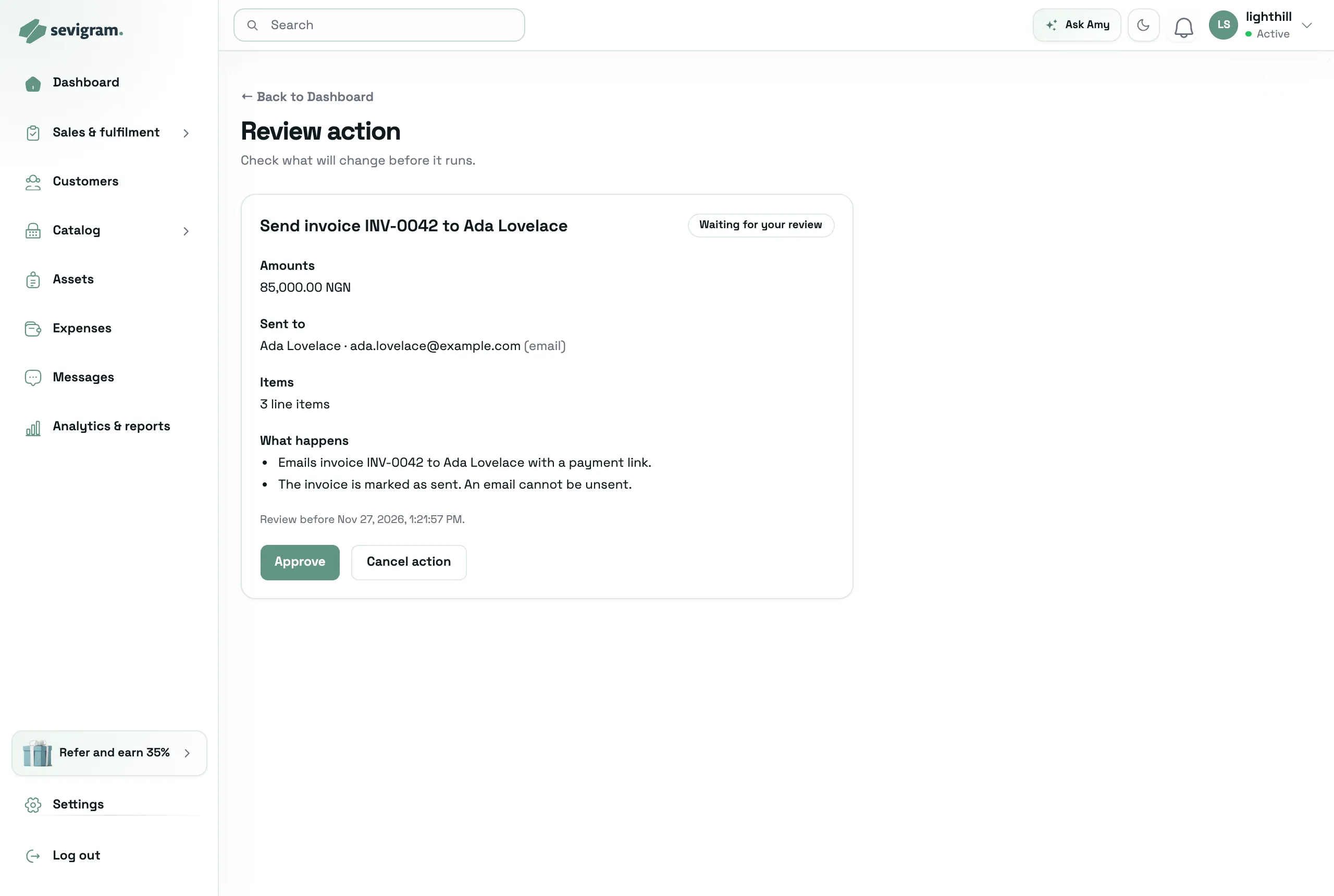
A review link opened in Sevigram, with demo data. -
Select Approve to run it, or Cancel action to drop it.
-
Back in the chat, ask the app to check, and it reports the result using
get_action.
A review link:
- expires 15 minutes after it’s prepared. After that, ask for the change again;
- can only be approved by a member with permission to make that change;
- shows the exact version that will run. If the record changes in the meantime, approval stops and you’re asked to review again;
- starts running within 5 minutes of approval, or it’s stopped.
Tools that need a Sevigram review link
assets_archive_attachment, assets_import, assets_retire, bookings_deliver_item, bookings_finish_session, bookings_reschedule_item, catalog_create_batch, catalog_delete, catalog_delete_collection, catalog_generate_missing_barcodes, customers_import, deliverables_archive, deliverables_import, delivery_dispatch_set, delivery_rates_copy, delivery_rates_replace, expenses_delete, expenses_import, inventory_adjust, inventory_transfer, invoices_create_fulfilment, invoices_create_replacement, invoices_issue, invoices_record_payment, invoices_record_refund, invoices_reverse_payment, invoices_send, invoices_void, locations_activate, locations_deactivate, locations_set_coverage, locations_set_default, locations_set_hours, locations_set_members, orders_accept, orders_accept_negotiation, orders_cancel_manual, orders_complete_manual, orders_correct_invoice, orders_deliver, orders_generate_invoice, orders_issue_manual_invoice, orders_mark_manual_paid, orders_propose_negotiation, orders_record_manual_refund, orders_reject, orders_reject_negotiation, orders_resolve_dispute, orders_send_invoice, orders_update_product_fulfilment, quotes_create_fulfilment, quotes_create_invoice, quotes_publish, quotes_record_response, quotes_send, quotes_withdraw
Change states
Section titled “Change states”get_action and the review page report one of these states:
| State | Meaning |
|---|---|
pending_review |
Waiting for you to approve it in Sevigram. |
approved |
Approved, about to run. |
executing |
Running now. |
succeeded |
Done. The result is available. |
failed |
It didn’t run. The reason is given. |
outcome_unknown |
Sevigram couldn’t confirm the result. Check the record before you retry. |
cancelled |
You cancelled it. |
expired |
Not approved in time. Ask again. |
How the apps see this
Section titled “How the apps see this”For each tool, Sevigram sends standard MCP hints, so the app knows to ask before it acts:
readOnlyHintis set for reads and calculations.destructiveHintis set for every change that overwrites, cancels, sends or finalizes something. Only changes that purely add something new are non-destructive.openWorldHintis set for changes that reach outside your account, such as anything that emails a customer or changes what shoppers see on your storefront.
Each tool’s description also says whether it runs on confirmation or returns a review link.